How to Study With AI Without Letting It Think For You
AI can make you a better student or a worse one. What the research says, the habits that keep you learning, and how to use an AI tutor that answers from your own notes.
Published 3 min read

AI can explain anything, any time, at any level. That makes it the best study tool ever invented — or a very efficient way to avoid learning anything at all. The difference isn't the tool. It's how you use it.
This guide covers what the research says, five rules for studying with AI, and what to look for in an AI tutor.
What the research says
The most striking evidence so far comes from a large field experiment in high-school maths, published in PNAS by Bastani and colleagues (2025). Students practised with either:
- no AI,
- a standard chatbot, or
- a chatbot set up as a tutor — it gave hints and guidance rather than answers.
Both AI groups did much better during practice. But on the later exam, taken without AI, students who had used the standard chatbot did worse than students who never had AI at all. The tutor-style version largely avoided that harm.
The lesson: when AI does the thinking, practice looks great and learning suffers. When AI makes you do the thinking, it helps.
5 rules for studying with AI
1. Try first, then ask
Attempt the problem or question yourself before asking. Even a failed attempt makes the explanation stick better (Kornell, Hays & Bjork, 2009). Ask AI to check your answer, not to give you one.
2. Ask for hints, not solutions
"Give me a hint for the next step" or "what's wrong with my reasoning?" keeps you doing the work. "Solve this" doesn't.
3. Make AI quiz you
The most valuable thing an AI can do for revision is ask you questions. Generate practice questions from your notes, answer them, and only then look at the answers. (See how to turn a PDF into a practice test.)
4. Check it against your source
General chatbots can sound certain and be wrong, and they don't know what's on your syllabus. Prefer AI that answers from your own material and shows where each claim came from — then open the page.
5. Explain it back
After AI explains something, close the chat and explain it yourself, in your own words. If you can't, you borrowed the understanding; you didn't build it. (That's the Feynman technique.)
What to look for in an AI study tool
| Look for | Why |
|---|---|
| Answers from your own material | Stays on your syllabus, at your course's level. |
| Citations to the page | Lets you check every claim in one tap. |
| Practice questions, not just chat | Testing is what builds memory. |
| Step-by-step explanations you can drill into | Understand each step instead of copying the final answer. |
| Memory of what you get wrong | So the AI's help targets your actual gaps. |
For a side-by-side look at the options, see our roundup of the 8 best AI study tools.
AI tutoring in DeepRevision
PinPoint: answers from your own pages
PinPoint is DeepRevision's AI tutor. Ask anything about what you're studying and it answers from your material — pulling the right figure straight out of your PDF and numbering every claim so you can open the page it came from. If you want, it can answer from the web or YouTube instead.
From any PinPoint answer you can teach it back in your own words and see which ideas you missed.
Solve: every step, explained
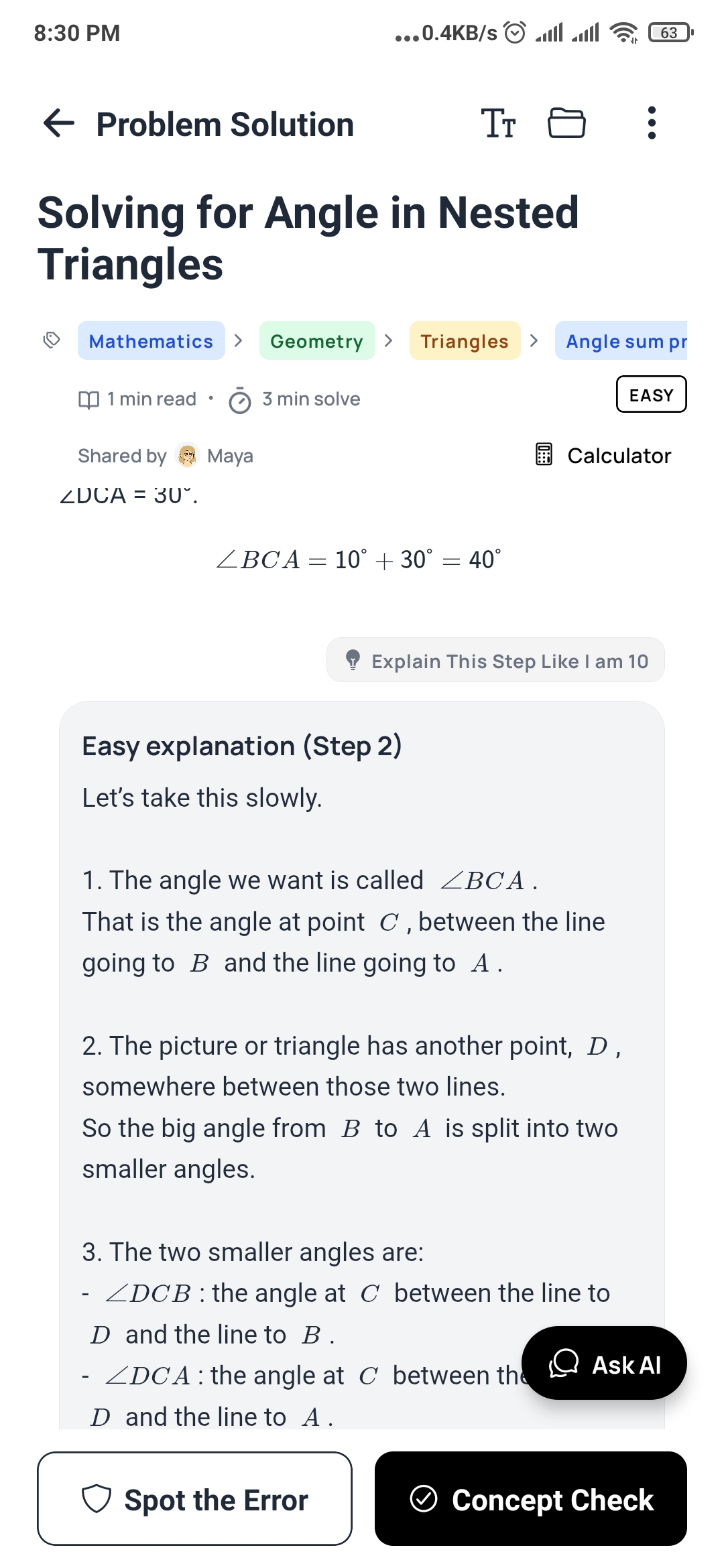
Photograph a problem from your book or the board, and Solve returns it worked step by step, each step named. Stuck on one line? Explain any step like you're 10, in plain words — in English or your own language. Then test yourself with Concept Check and Spot the Error, so you practise the method rather than just reading it.
And the parts that make it stick
Questions written from your notes, scheduled with spaced repetition, and every wrong answer kept and explained — so the AI's help is aimed at exactly what you keep missing.
The bottom line
Use AI as a tutor, not a ghostwriter. Let it ask you questions, check your reasoning, and explain what you got wrong — and keep doing the thinking yourself. The test of whether it worked is always the same: can you do it without the AI?
Frequently asked questions
Is using AI to study cheating?
Using AI to understand material, quiz yourself or check your reasoning is studying. Submitting AI-written work as your own is usually against your institution's rules. Check your course's policy — it varies — and use AI to learn, not to produce answers you hand in.
Can AI hurt learning?
It can. In a large field study in high-school maths, students who used an unrestricted AI chatbot during practice did better in practice but worse on a later exam without it. A version designed as a tutor, which gave hints rather than answers, largely avoided that harm.
How do I stop AI from making things up?
Use AI that answers from your own course material and shows where each claim came from, and check important answers against the source. Be especially careful with numbers, citations and specific facts.
What is the best way to use AI for exam revision?
Use it to generate practice questions from your notes, to explain concepts you got wrong, and to check your own explanations. Avoid using it to do the work you'll have to do yourself in the exam.
Sources
- Bastani, H., Bastani, O., Sungu, A., Ge, H., Kabakcı, Ö., & Mariman, R. (2025). Generative AI without guardrails can harm learning: Evidence from high school mathematics. Proceedings of the National Academy of Sciences, 122(26), e2422633122. doi:10.1073/pnas.2422633122
- Kornell, N., Hays, M. J., & Bjork, R. A. (2009). Unsuccessful retrieval attempts enhance subsequent learning. Journal of Experimental Psychology: Learning, Memory, and Cognition, 35(4), 989–998. doi:10.1037/a0015729
Stop studying everything. Study what you’re getting wrong.
DeepRevision turns your notes, slides and lectures into practice questions, finds the ones you keep missing and why, and brings each one back right before you’d forget it.
Written by
The people who build DeepRevision
We build DeepRevision, a study app that turns your own notes, slides and lectures into practice questions and brings back the ones you get wrong right before you'd forget them. We write about the research behind how students remember, and how to use it before an exam.


